GDB: A Real-World Benchmark for Graphic Design
Adrienne Deganutti, Elad Hirsch, Haonan Zhu, Jaejung Seol, Purvanshi Mehta
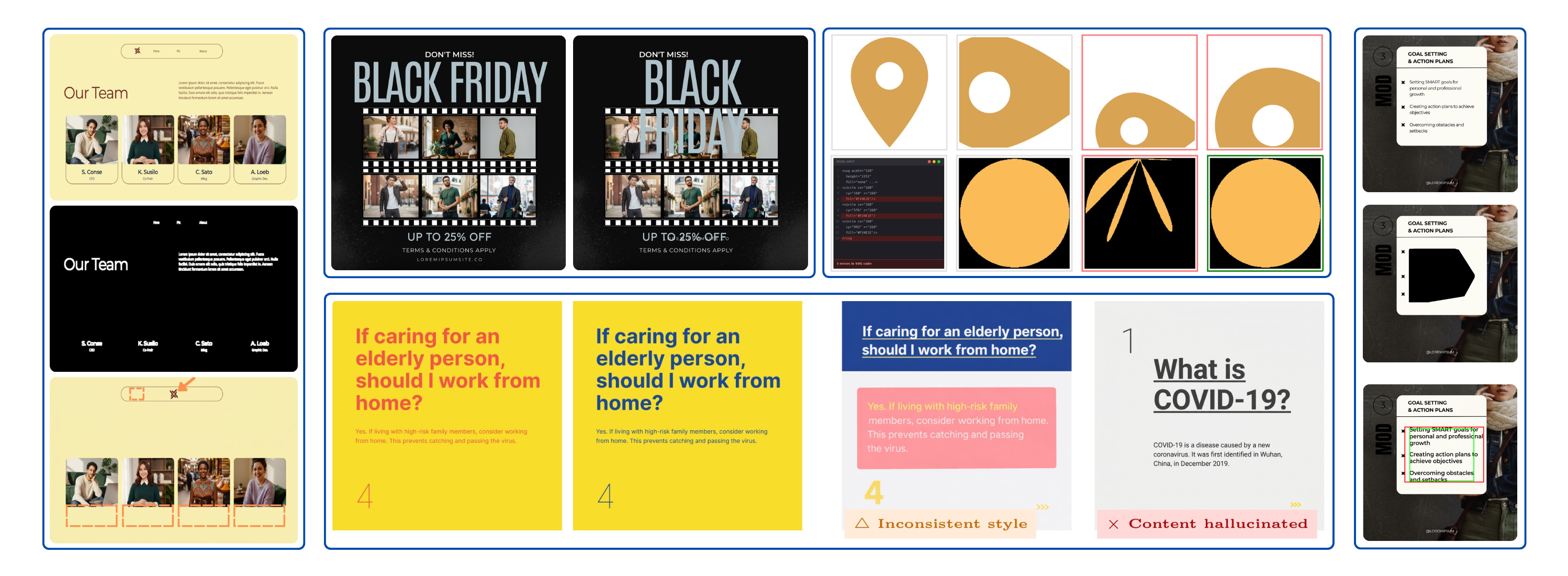
Every day there is a rage bait claim that AI will replace designers. Designers disagree. We decided to collect data to measure where AI wins and fails. We present GraphicDesignBench (GDB), the first large-scale benchmark grounded in the work marketing and branding teams ship every day. A reproducible signal for where AI models stand, and what still needs to change before they can do real design work.
GDB targets the unique challenges of professional design work:
- turning a brief into a structured layout
- getting the typography right: font, size, weight, spacing
- editing a live design without breaking what's already there
- working with layers, masks, and grouped elements
- producing clean, valid SVG and Lottie files
- generating and understanding animation
All 49 tasks are grounded in real-world templates from the LICA dataset and scored with design-specific automated metrics. The full methodology is in the paper. Our results show a clear pattern: models handle high-level semantic tasks, but break down sharply once precision, structure, and multi-element composition enter the picture.
How GDB is structured
The 49 tasks split across five design domains and two modes. Understanding: can the model read an existing design? Count elements, identify fonts, detect layer order. Generation: can the model produce or edit a design that a human would actually use?
| Domain | Mode | # | Description |
|---|---|---|---|
| Layout | Understanding | 8 | Spatial reasoning over design canvases: aspect ratio, element counting, component type and detection, layer order, rotation, crop shape, and frame detection. |
| Generation | 4 | Producing and completing layouts: intent-to-layout generation, partial layout completion, layer-aware inpainting, multi-aspect ratio adaptation. | |
| Typography | Understanding | 10 | Perceiving fine-grained text properties: font family, color, size, weight, alignment, spacing, curvature, style ranges, and rotation. |
| Generation | 2 | Rendering and editing text: styled text generation and text removal with background reconstruction. | |
| Infographics | Understanding | 5 | SVG code reasoning and editing: perceptual and semantic Q&A, bug fixing, code optimization, and style editing. |
| Generation | 5 | Generating vector graphics and animations: text-to-SVG, image-to-SVG, combined image and text to SVG, text-to-Lottie, combined image and text to Lottie. | |
| Template & Semantics | Understanding | 5 | Interpreting design intent and structure: category classification, user intent prediction, template matching, ranking, and clustering. |
| Generation | 2 | Producing template-faithful layouts: style completion and recoloring. | |
| Animation | Understanding | 5 | Perceiving temporal design properties: keyframe ordering, motion type classification, duration (video and component), and start-time prediction. |
| Generation | 3 | Generating animated design content: animation parameter generation, motion trajectory synthesis, and short-form video generation. | |
| Total | 49 | ||
Models evaluated
We tested seven frontier closed-source models across three capability tiers. Not every model applies to every task: image generators are evaluated only on generation tasks that accept image output, and video generators only on animation generation.
Explore all tasks and results
The headline result: no model is ready for professional design work. Pick any domain and task below to see for yourself. Metrics are drawn directly from the paper, best values per column are highlighted, and qualitative outputs are shown where available.
Aspect ratio classification
989 layouts
Predict canvas aspect ratio from nine categories from visual content alone.
GPT-5.4 near-solves this (93.9%); all other models below 25%.
| Model | Accuracy↑ | Macro-F1↑ |
|---|---|---|
| Gemini-3.1-Flash-Lite | 0.236 | 0.105 |
| Gemini-3.1-Pro | 0.245 | 0.085 |
| GPT-5.4 | 0.939 | 0.679 |
| Claude Opus 4.6 | 0.093 | 0.179 |
What the numbers mean for real work
We label each task using thresholds calibrated with design experts. Mostly solved (> 95%): good enough to ship without manual review. Partially solved (80–95%): the model gets the gist but produces output a designer still has to inspect and fix. In practice, fixing an 80%-right layout often takes longer than starting from scratch. Unsolved (< 80%): not usable in a production workflow today.
The split across 49 tasks: 2 mostly solved, 25 partially solved, 22 unsolved. Every domain contributes unsolved tasks. The two that are mostly solved (template matching and ranking) are the narrowest tasks in the benchmark, and even there a simple font-overlap baseline matches the best LLM.
- Spatial grounding is missing. Component detection sits at 6.4% mAP. The model cannot reliably point at things in a layout, let alone move them.
- Fine-grained perception breaks down. Font recognition tops out at 23.7% across 167 families. Text color, size, and weight show similar gaps.
- Vector code generation is not production-ready. Text-to-SVG produces rough sketches. Lottie generation is worse: validity drops from 100% to 66% when image input is added.
- Compositionality does not scale. Single-element tasks are often tractable; add a second element and metrics drop sharply across layout, animation, and scene decomposition.
No single model dominates. Each leads on different tasks, and their strengths barely overlap. “Design AI” is not one capability; it is a bundle of poorly correlated skills, and no product today assembles the full set.
These numbers will change. Models are improving fast, and we plan to re-run GDB on every major model release so the benchmark stays current.
What's next
GDB is open: paper, code and data. This version relies on automated metrics and only evaluates closed-source models. Both are gaps we are actively fixing, alongside a prompt-engineering study and cross-task analysis.
If you build design AI, whether models, tools, or workflows, open a PR to add a task, report results on a new model, or propose a metric. If you are a designer, share this with your team the next time someone claims AI can do your job. The numbers tell a different story.